Information
Help
Firewall Warnings
Security
Other Info
Installation & Download
|
Information |
|
This is an automated method for sending database files to Corporate Consultants for tech support purposes. Click here for a manual method.
As a method of determining the exact cause of tech support issues, you may be asked to provide a detailed description of your problem, along with a copy of your database files so that the problem can be reproduced at Corporate Consultants. This program will automatically upload the database files from Box Office Xpress or Box Office Xpress Junior to Corporate Consultants. It will do so in a compressed format that has encrypted the files.
After the upload is completed, you will then be prompted to e-mail specifics about the problem you are experiencing, with emphasis on the steps needed to replicate the problem.
The data will be examined and you will be contacted once the problem has been identified. Depending on the nature of the problem, a resolution can often be determined within 2 hours. More difficult problems may take 2 business days or more.
Internet Connection: You will require an open Internet connection to use this program. Although high speed is desirable, dial-up will work, but be prepared for the upload to take quite a few minutes to complete.
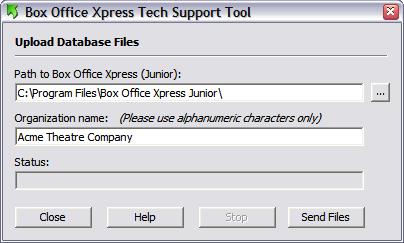
[...] Locate button: If the path to the Box Office Xpress or Box Office Xpress Junior program file was not automatically placed in the Path field, please click the Locate button [...] to find it. Be sure to just select the path to the program folder, and not the path to the Data subdirectory.
Organization Name field: This field is required so that we can identify both the uploaded file and the e-mail after they arrive.
Send Files button: Click then Send Files button to start the process. The program will automatically locate all the database files, compress them into a zip file, encrypt the files, and then upload those files to Corporate Consultants.
A new e-mail message will then open. This is for you to send details about the problem and how to recreate it. Other information will automatically be included in the e-mail, which you must leave as is. Send the e-mail when you are done.
Note: This should work with all e-mail programs, however, it your e-mail program does not work, then please just create an e-mail and send it off to us outline the details of the problem.
Stop button: You can attempt to stop the program during the early stage of the process by clicking the Stop button. However, once you get to the zipping and upload stage, the process cannot be stopped (the button will become disabled).
Help button: Connects to the Internet and opens this web page.
If you have a software firewall installed, it is very possible that it will complain loudly about the upload process of the files, during the first time that you use the program. Please select whatever option your firewall has to automatically allow the transfer to continue.
No information other than the database files is being transferred to Corporate Consultants. Also, these files are encrypted prior to being sent.
After the upload process is completed, it's possible that a folder called "BOX_Temp" may be left behind in your 'C' directory. The program tries to delete it prior to closing, but sometimes Windows may not allow it, thinking the folder may still be needed. You may delete it if you wish, but you may have to wait until you restart Windows before doing so.
Download the file to any directory on your hard drive.
Using Windows Explorer, double-click on the file to start the installation program.
If you get a Windows Installer error, you need to have the latest version of Box Office Xpress (Junior) installed first.
Go to the Box Office Xpress Tech Support Tool download page.